
Automate Your Work
Workflow automation for the work that keeps getting stuck
If approvals sit in inboxes and the same data gets typed into several systems, workflow automation can help. We simplify the process slowing your team down, then automate it with the tools you already use and connect the systems that should share information.
Start with the process slowing your team down
Business process automation works best one process at a time. We start with the one causing the most delay, map how the work happens and remove the steps that don’t need to exist, because automating a bad process just makes it faster. Then we automate the routine parts with the tools you already have and measure the result against how it worked before. A Starter Automation Sprint takes one workflow from mapped to running in three to five weeks. When a step needs judgment, like reading documents or sorting requests, we add AI automation.
- Keep approvals moving. Route requests, send reminders and retain human review where needed.
- Enter information once. Connect forms and systems so records update automatically.
- See where work stands. Show what’s complete, what’s waiting and who approved what.


Featured automation solutions
Connect your systems
Automate everyday work
Reporting & insights
Automate the paperwork your industry runs on
Featured industries
Automate job site paperwork
- Purchase order approvals
- Change-order sign-off
- Invoice approvals
- Timesheet approvals
- Subcontractor onboarding packages
- Safety form routing
- Daily site report distribution
- RFI and submittal routing
- Certification expiry alerts
- Equipment booking requests
- Project document filing
- Job status dashboards
Fig. 01 · A few of the construction workflows we can automate
Automate production paperwork
- Purchase requests
- Maintenance requests
- Non-conformance reports
- Corrective action tracking
- Engineering change approvals
- Quality check sign-off
- Shift handover reports
- Supplier onboarding
- Reorder alerts
- Customer complaint routing
- Training sign-off
- Production KPI dashboards
Fig. 02 · A few of the manufacturing workflows we can automate
Automate field paperwork
- Inspection forms to finished reports
- Ticket and credential expiry alerts
- Incident and near-miss reporting
- Hazard assessment sign-off
- Permit-to-work routing
- Management of change approvals
- Contractor onboarding
- Work-order status updates
- Vendor invoice approvals
- Regulatory report collection
- Escalation alerts
- Safety and compliance dashboards
Fig. 03 · A few of the energy and utility workflows we can automate
Automate fleet paperwork
- Driver onboarding files
- Licence and medical expiry alerts
- Pre-trip defect follow-up
- Proof-of-delivery filing
- Accident and damage claims routing
- Repair approvals
- Load confirmation filing
- Carrier invoice approvals
- Customer delivery notifications
- Expense approvals
- Fuel log reports
- Delivery performance dashboards
Fig. 04 · A few of the logistics workflows we can automate
What changed for our clients.
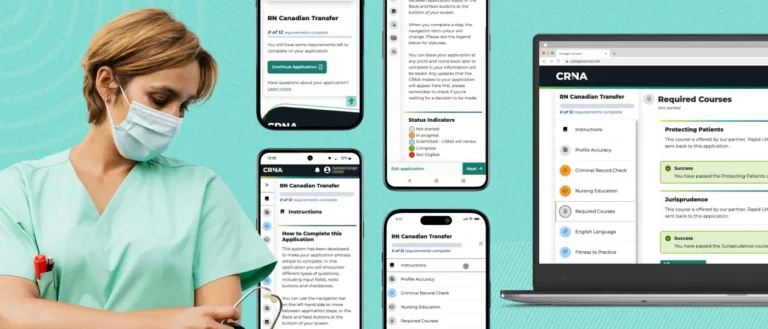
College of Registered Nurses of Alberta · Process automation
Automated 10,000+ ID and criminal record checks in 2025.
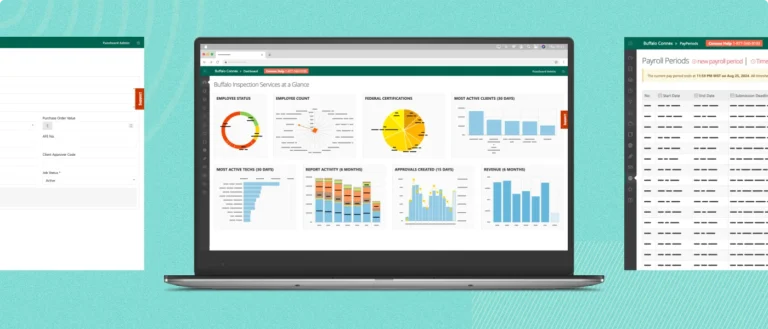
Buffalo Inspection Services · Field reporting and invoicing
Recovered $350,000 in unpaid invoices.
Questions about workflow automation.
Which business process should we automate first?
Start with a frequent, repetitive task that follows clear rules and takes up time or causes errors, such as approvals, data entry or weekly reports. If the steps are unclear, simplify the process before automating it.
Can you automate work using the tools we already have?
Often, yes. If your team works in Microsoft 365, Power Automate and Power Apps can handle many approval and intake workflows. Some connectors and features need premium licences, and we confirm what your plan includes during planning. When a process is complex or client-facing, a custom application may be a better fit.
How long does workflow automation take?
It depends on how many steps, people and systems the process involves. A single workflow is often designed, built and tested within about five weeks. Larger programs are planned after the first workflow is running, so you can see what changed first. Changes are rolled out in phases to limit disruption.
Can people still review or approve important decisions?
Yes. Automation handles the routine steps, while people stay responsible for decisions that need judgment. We build approval checkpoints where they matter and route exceptions to a named person instead of forcing them through. Workflows can record decisions and key actions, so you can review what happened when a question comes up.
Who maintains an automated workflow after launch?
Your team can, and we prepare you for it. Each project includes training, an admin guide and a check-in period after launch. The workflows run in your environment and belong to your organization. If you would like us to keep improving them, the same team is available for ongoing support.
The Microsoft tools we use for automation
Microsoft Solutions Partner
Looking to automate repetitive work?
Spending too much time on repetitive tasks, manual processes or chasing approvals? Tell us where time gets lost. We’ll help you explore what could be automated.


Real people, here to help
We’ll get back to you within one business day
"*" indicates required fields
Your information is used to respond to your enquiry. See our Privacy Policy for details.