
Retail
Retail technology solutions for stores and head office
Inventory in spreadsheets, store checklists on paper, and customer apps that haven’t kept up. We build the tools your customers and store teams use every day, and connect them to the systems you already run.
Customers expect more. Your store teams are already stretched.
Inventory numbers don’t match, store requests pile up in email, and customers expect quick answers. We connect stores, head office, and customer tools so everyone works with up-to-date information.
Win repeat customers.
Apps, loyalty programs, and booking that make it easy to come back.
Know what’s in stock.
Inventory you can trust across stores and online.
Run stores the same way.
Checklists, audits, and price changes every store follows.
See today’s numbers.
Store performance without waiting on a spreadsheet.


What we build for retailers
Custom software for customers and stores
- Customer mobile apps
- Loyalty programs
- Online booking tools
- Product lookup apps
- Barcode scanning apps
- Store operations apps
- Inventory tracking tools
- Customer self-serve portals
- Quote and order tools
- Supplier portals
- Store audit apps
- Store manager apps
Fig. 01 · A few of the custom retail apps we can build
Modernize your store and online systems
- Old e-commerce platforms
- Spreadsheet inventory
- Access and FileMaker databases
- Old customer apps
- Store and head office connections
- Unsupported servers moved to Azure
- Old loyalty databases
- Data migration from old databases
- Reporting from old databases
- Native apps moved to React Native
- Product data cleanup
- Old supplier portals
Fig. 02 · A few of the retail systems we can modernize
Automate store paperwork
- Store opening checklists
- Price change approvals
- Inventory transfer requests
- Reorder alerts
- Supplier onboarding
- Customer complaint routing
- Store audit follow-ups
- Promotion approvals
- Staff onboarding
- Expense approvals
- Damaged goods reporting
- Store performance dashboards
Fig. 04 · A few of the retail workflows we can automate
Practical AI for retail teams
- Product image recognition
- Product description drafts
- Customer question assistants
- Review and feedback summaries
- Policy search for store staff
- Inventory forecasting support
- Sales trend summaries
- Promotion copy drafts
- Supplier document review
- Return reason analysis
- Training content drafts
- Copilot readiness
Fig. 05 · A few of the ways we can use AI in retail
What this looks like in retail
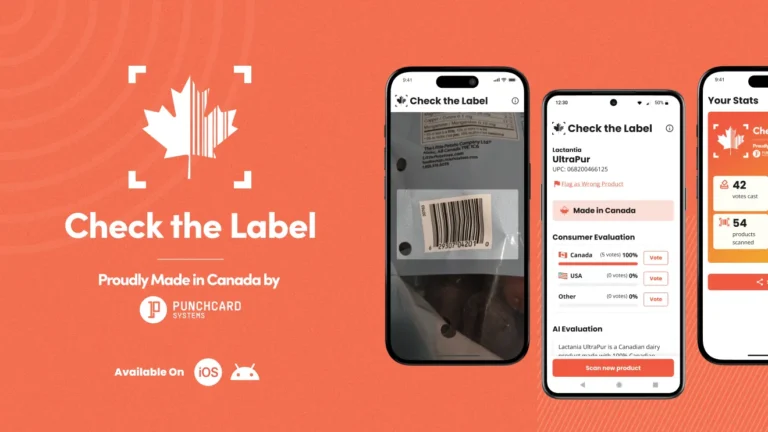
Check the Label
Built a made-in-Canada scanner downloaded 40,000 times.
How we find the right fix
Five steps. You know the cost before any building starts.
Understand how you work.
It starts with a free assessment. We look at your stores, your customers, and the systems behind them.
Find a solution.
We show you what to build, what to connect, and what to leave alone.
Agree.
Scope, fixed fee, timeline, and the number that tells us it worked. All in writing before you commit.
Build.
A small team of developers, a designer, and a product lead works with you every day, and store managers test it before it rolls out.
Grow over time.
We stay after launch, through busy seasons and new store openings.
Retail technology questions
What is retail automation?
Retail automation is software that handles routine store and head office tasks, like reorder alerts, price change approvals, inventory transfers, store checklists, and complaint routing. It cuts manual work and mistakes, so staff spend more time with customers.
How do retailers balance automation with the human touch?
Automate the back-office work customers never see, like reorders, approvals, and reporting. Keep people where customers notice them. Good automation gives store teams more time on the floor.
How does automated inventory management support omnichannel retail?
When stock levels update automatically across stores and online, customers see what’s really available. Staff stop overselling and hunting for products. That’s the starting point for reliable online ordering, store pickup, and transfers between locations.
How is AI used in retail?
Common uses include recognizing products from photos, drafting product descriptions, answering customer questions, summarizing reviews, and forecasting inventory. Start with one use tied to a clear number, like time saved or fewer returns, and expand from there.
Should we build a custom retail app or use an off-the-shelf platform?
Use off-the-shelf when it fits how you sell. Build custom when your loyalty, booking, or store operations set you apart and the platform gets in the way. Often the answer is to keep your platform and build the customer-facing piece on top.
Let’s make your stores easier to run
Tell us what’s slowing down your stores, your customers, or head office. We’ll help you find the next step.
- Daily access to your product, design and development team.
- Clear scope and fixed fees before you commit.
- Support after launch.


Real people, here to help
We’ll get back to you within one business day
"*" indicates required fields
Your information is used to respond to your enquiry. See our Privacy Policy for details.