
Microsoft 365 & SharePoint
Microsoft 365 and SharePoint consulting for the way you work
When files are hard to find and teams work from different versions, work slows down. Our Microsoft 365 and SharePoint consultants organize your sites, files and Teams around how you work, so people find what they need in the tools you already pay for.








Partner designations
- Modern Work
- Data & AI (Azure)
- Digital & App Innovation
Give your team one place to find what they need
Our Microsoft 365 and SharePoint consulting usually starts with what you already have. We keep the sites and structures that work, then set up, migrate or rebuild the rest, whether that’s a staff intranet, document libraries, Teams, or a Microsoft 365 migration from file servers or Google Workspace. We set permissions by role, name content owners and train the people who will keep everything current.
- Find the current version. Keep policies, templates and forms organized and easy to find.
- Give staff one place to start. Bring news, onboarding resources and everyday tools together.
- Keep shared work moving. Connect forms, lists and approvals without emailing files between teams.
- Be ready for Copilot. Sort out permissions and content before rollout, so Copilot only shows people what they should see.


Featured Microsoft 365 solutions
SharePoint & intranets
Files & records
Planning & governance
SharePoint add-on apps
SharePoint shaped around how your industry works
Featured industries
SharePoint and Teams for nonprofits
- Staff intranets
- Board and committee sites
- Program documentation libraries
- Policy libraries
- Grant and funding libraries
- Volunteer resource hubs
- Donor file organization
- Onboarding hubs
- Department news sites
- Teams setup for staff
- Site owners and governance
- Permissions by role
Fig. 01 · A few of the SharePoint tools we can set up for nonprofits
SharePoint and Teams for care teams
- Clinical policy libraries
- Procedure manuals
- Staff intranets
- Physician and member portals
- Committee sites
- Continuing education libraries
- Onboarding hubs
- Accreditation evidence libraries
- Teams for shift and clinic staff
- Secure file sharing
- Document retention rules
- Microsoft 365 rollouts
Fig. 02 · A few of the SharePoint tools we can set up for healthcare teams
SharePoint and Teams for field crews
- Teams as the front door for field crews
- Hub intranets
- SharePoint Online migration
- Safety manual libraries
- Field form libraries
- Project and site workspaces
- Engineering document libraries
- Contractor file sharing
- Internal champion programs
- Equipment manual libraries
- Shift notices and news
- Permissions by role
Fig. 03 · A few of the SharePoint tools we can set up for energy and utilities
SharePoint and Teams for your firm
- Employee intranets
- Sales enablement portals
- Client workspaces
- Practice and department hubs
- Proposal and template libraries
- Knowledge and precedent libraries
- Policy and compliance libraries
- Document version control
- Sensitivity labels
- Teams channels by client
- Onboarding hubs
- Copilot readiness
Fig. 04 · A few of the SharePoint tools we can set up for law, accounting, and consulting firms
What changed for our clients.
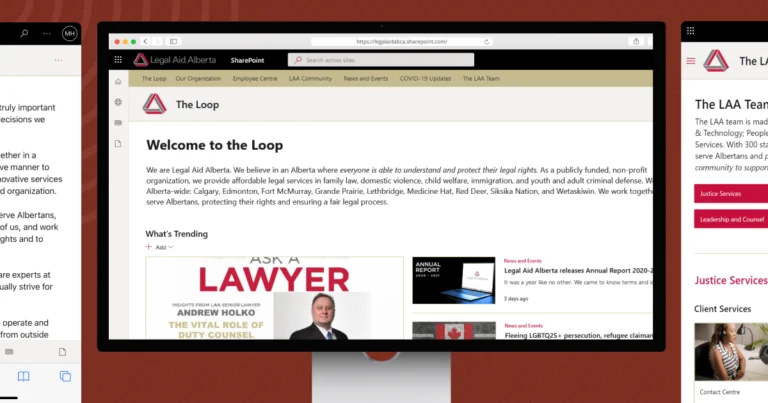
Legal Aid Alberta · SharePoint intranet
Rebuilt the intranet for 300+ staff on SharePoint.

ENT Oilfield · Teams and SharePoint Online
Got email-averse field crews working in Teams.
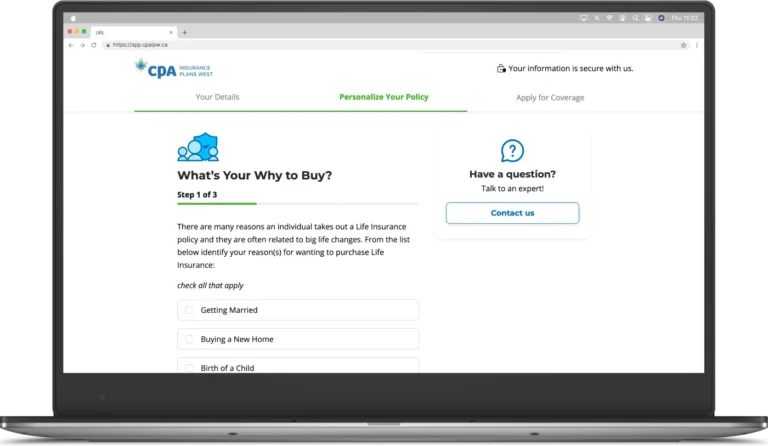
CPA Insurance Plans West · Online applications
Increased application completions by 20%.
Questions about Microsoft 365 consulting.
How much does Microsoft 365 and SharePoint consulting cost?
Cost depends on how many teams are involved, how much content needs reorganizing or moving, and what needs to be built. We agree on scope and provide a cost estimate before you commit. We also identify any additional Microsoft licences the work may need.
Can you improve the Microsoft 365 setup we already have?
Yes, and that is where most projects start. We review what you have, keep the sites and structures that work, and reorganize the rest around how people search for information. Moving everything as-is usually moves the mess with it, so we decide with you what to keep, archive or delete before anything is migrated.
How do you manage permissions, security and governance?
Microsoft 365 includes multi-factor authentication, encryption and threat protection, but much depends on configuration. We set permissions by role, review how files are shared, apply sensitivity labels where needed and name an owner for each site. A governance plan sets out who can create, change and remove content.
Will we need additional Microsoft licences?
It depends on your current plan and what you want to do. Many intranet, document management and approval projects can be delivered with the licences organizations already have. Some features, such as advanced compliance tools, premium Power Platform connectors or Copilot, may need additional licences. We identify those requirements early so you can weigh the cost.
Can you train and support our team after launch?
Yes. We train the people who will run the environment, including internal champions who help colleagues adopt new ways of working. You receive a governance model with named owners and a handover package. If you want help after launch, the same team can provide ongoing support.
The Microsoft 365 tools we work with
Microsoft Solutions Partner
Want more from Microsoft 365?
Finding it difficult to manage files, work together or get value from Microsoft 365? Tell us what’s happening. We’ll help you find a good place to start.


Real people, here to help
We’ll get back to you within one business day
"*" indicates required fields
Your information is used to respond to your enquiry. See our Privacy Policy for details.