
Professional Services
Professional services digital transformation for law, accounting, and consulting firms
Client files across drives, proposals rebuilt from scratch, and admin that eats into billable time. We build the systems behind your practice so your people spend more time on client work.
Your people bill for expertise. Too much of their day goes to admin.
Client intake, proposals, and approvals get stuck in inboxes and shared drives. We connect your tools and simplify routine tasks so your people can spend more time doing the work clients pay for.
Win work faster.
Proposals and engagement letters built from your best past work.
Onboard clients cleanly.
Intake, conflict checks, and new matters move without chasing.
Protect client files.
Secure sharing and permissions that hold up to an audit.
Recover non-billable time.
Less admin, more time for client work.


What we build for law, accounting, and consulting firms
Custom software for your firm and clients
- Client portals
- Engagement tracking tools
- Proposal builders
- Time tracking tools
- Resource scheduling tools
- Client intake forms
- Assessment and scoring tools
- Report generators
- Document assembly tools
- Client knowledge bases
- Partner and reseller portals
- Project dashboards
Fig. 01 · A few of the custom apps we can build for professional services firms
Modernize your practice systems
- Old practice management systems
- Access and FileMaker databases
- Spreadsheet resourcing
- Old client portals
- Document archive migration
- Desktop tools moved to the web
- Unsupported servers moved to Azure
- Old time tracking systems
- Data migration from old databases
- Reporting from old databases
- File server retirement
- Staff single sign-on
Fig. 02 · A few of the professional services systems we can modernize
Automate client paperwork
- Client onboarding checklists
- Conflict check requests
- Engagement letter approvals
- New matter setup
- Proposal approvals
- Document review routing
- Time-off approvals
- Timesheet reminders
- Expense approvals
- Invoice approvals
- Contract renewal reminders
- Utilization dashboards
Fig. 04 · A few of the professional services workflows we can automate
Practical AI for law and consulting firms
- Search across past work
- Proposal first drafts
- Meeting summaries
- Contract review support
- Research summaries
- Client e-mail drafts
- Knowledge assistants
- Report first drafts
- Time entry descriptions
- AI training for staff
- AI governance policies
- Copilot readiness
Fig. 05 · A few of the ways we can use AI in professional services
What this looks like inside a firm
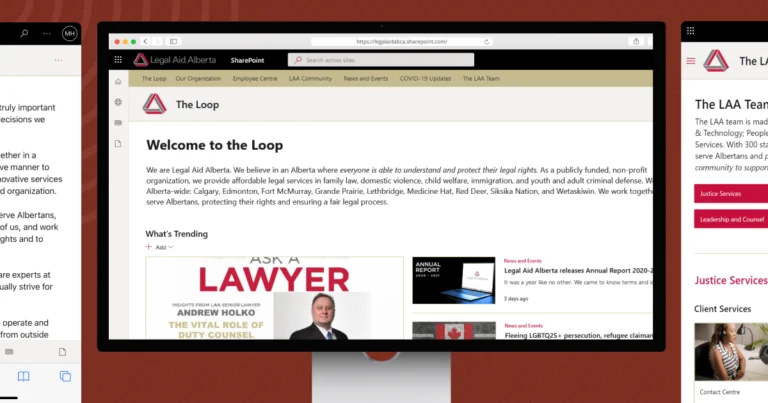
Legal Aid Alberta
Gave 300+ staff an intranet they can actually navigate.
How we find the right fix
Five steps. You know the cost before any building starts.
Understand how you work.
It starts with a free assessment. We look at your practice, your clients, and where admin time goes.
Find a solution.
We show you what to build, what to connect, and what to leave alone.
Agree.
Scope, fixed fee, timeline, and the number that tells us it worked. All in writing before you commit.
Build.
A small team of developers, a designer, and a product lead works with you every day, and your partners and staff test it as we go.
Grow over time.
We stay after launch to support it and adapt it as your practice grows.
Questions firms ask us
Which AI is best for law firms?
The best tool works on your own documents, keeps client data private, and fits your existing systems. For firms on Microsoft 365, Copilot is often a sensible start once permissions are in order. We help you choose based on your matters, your risk, and your data.
How do law firms test legal AI outputs for accuracy?
Add a review step. Compare AI answers against known matters, require links back to source documents, and have a lawyer check outputs before anything reaches a client. Track errors over time. We build these checks into any AI tool before it goes live.
Is SharePoint a good fit for law and accounting firms?
Yes, when it’s set up for client work. SharePoint handles client workspaces, version control, sensitivity labels, and secure external sharing. The real work is structure and permissions, so confidential files stay with the right people.
Do we need to replace our practice management software?
Usually not. Most practice management tools handle the core well. We build the pieces around them, like client portals, intake forms, and reporting, and connect them to what you already use.
What can be automated in a law or accounting firm?
Anything that follows a set path. That includes client onboarding, conflict check requests, engagement letter approvals, new matter setup, timesheet reminders, and invoice approvals. If people chase each other by email to get it done, it’s a good place to start.
Let’s give your team more time for client work
Tell us which admin task takes the most time from client work. We’ll help you find the next step.
- A Canadian team based in Edmonton.
- Clear scope and fixed fees before you commit.
- You own what we build.


Real people, here to help
We’ll get back to you within one business day
"*" indicates required fields
Your information is used to respond to your enquiry. See our Privacy Policy for details.