
Construction
Construction technology solutions built for the field and the office
Daily logs on paper, job costs in spreadsheets, and equipment nobody can find. We build software around how your crews work, so the office sees what’s happening on site.
The job moves fast. The paperwork doesn’t.
Safety forms get filled out twice, timesheets arrive late, and job costs are hard to track. We connect your field and office systems so crews spend less time on paperwork and you spot problems sooner.
Protect your margin.
See job costs while you can still act on them.
Enter it once.
Data captured in the field reaches the office automatically.
Keep equipment working.
Know where every machine is and who has it.
Stay audit-ready.
Safety forms and inspections are filed and easy to find.


What we build for construction companies
Custom software for your job sites
- Equipment tracking and dispatch
- Equipment check-out with QR codes
- Load and haul tickets
- Daily site report apps
- Site inspection apps
- Safety form apps
- Quoting and estimating tools
- Job costing tools
- Crew timesheet apps
- Subcontractor portals
- Client project portals
- Punch-list apps
Fig. 01 · A few of the custom construction apps we can build
Modernize your project systems
- Spreadsheet job costing
- Access and FileMaker databases
- Paper daily logs
- Old estimating software
- Desktop dispatch tools
- Accounting connections
- Unsupported servers moved to Azure
- Equipment records in spreadsheets
- Old project portals
- Data migration from old databases
- Office systems opened to field crews
- Reporting from old databases
Fig. 02 · A few of the construction systems we can modernize
Automate job site paperwork
- Purchase order approvals
- Change-order sign-off
- Invoice approvals
- Timesheet approvals
- Subcontractor onboarding packages
- Safety form routing
- Daily site report distribution
- RFI and submittal routing
- Certification expiry alerts
- Equipment booking requests
- Project document filing
- Job status dashboards
Fig. 04 · A few of the construction workflows we can automate
Practical AI for construction teams
- Daily report summaries
- Safety document search
- Specification and contract search
- Estimate drafting support
- Site photo sorting
- RFI response drafts
- Meeting summaries
- Bid document review
- Incident report summaries
- Equipment manual Q&A
- Policy and procedure assistants
- Copilot readiness
Fig. 05 · A few of the ways we can use AI in construction
What this looks like on the job
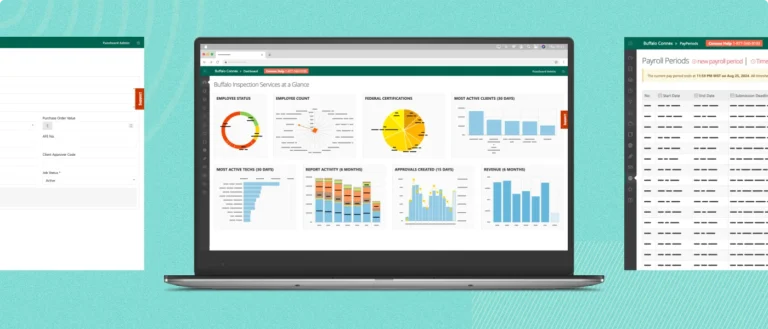
Buffalo Inspection Services
Filed 568,000+ field reports without paper.

ENT Oilfield
Moved field crews off paper and onto Teams.
How we find the right fix
Five steps. You know the cost before any building starts.
Understand how you work.
It starts with a free assessment. We look at your jobs, your crews, and the forms they fill out.
Find a solution.
We show you what to build, what to fix, and what to leave alone. Sometimes the answer is don’t spend the money.
Agree.
Scope, fixed fee, timeline, and the number that tells us it worked. All in writing before you commit.
Build.
A small team of developers, a designer, and a product lead works with you every day, and your field leads test it as we go.
Grow over time.
We stay after launch to support it, fix what comes up, and add what the next season needs.
Construction technology questions
How do you use AI in construction?
Start with the paperwork. The quickest wins are searching specs and safety manuals, summarizing daily reports, and drafting RFI responses. Pick one task that eats hours every week, try AI on it, and measure the time saved. We help you choose that first task and build it safely.
How is AI used in construction project management?
Project teams use AI to summarize daily reports and meetings, flag issues in bid documents, sort site photos, and answer questions from manuals and specs. It works best on organized documents, so document management is often the first step.
Should we buy construction software or build custom?
Buy when an off-the-shelf product fits how you work. Build when it doesn’t, or when you’re paying for three tools that don’t talk to each other. Often the answer is both: keep what works and build the missing piece. We’ll tell you which.
What can be automated in construction?
Most office work that follows a set path. That includes purchase order and change-order approvals, timesheets, subcontractor onboarding, safety form routing, and certification expiry alerts. If someone is chasing a signature by email, that task is a good place to start.
Can SharePoint handle construction document management?
Yes. SharePoint handles drawings, specs, safety manuals, and closeout packages, with version control and permissions by role. When it’s set up well, crews find the current drawing from their phone. We set it up around your projects so it doesn’t become another shared drive.
Let’s fix what’s slowing your jobs down.
Tell us which form, spreadsheet, or system is slowing your jobs down. We’ll help you find the next step.
- A Canadian team based in Edmonton.
- Clear scope and fixed fees before you commit.
- Support after launch.


Real people, here to help
We’ll get back to you within one business day
"*" indicates required fields
Your information is used to respond to your enquiry. See our Privacy Policy for details.